Text options: Texts and Rich Texts
In Pythagoras, you can add text to your drawing in several ways. Depending on the purpose—such as a simple label, a title, or a detailed explanation—you can choose between the standard Text tool and the more advanced Rich Text tool. Both text types have their own capabilities, limitations, and way of working. In this article, we explain the differences and help you make the right choice.
Overview: Text vs. Rich Text
Text | Rich Text | |
| APPLICATION | ||
| Suitable for short and simple text | Suitable for notes, explanations, and legal texts | |
| NUMBER OF CHARACTERS | ||
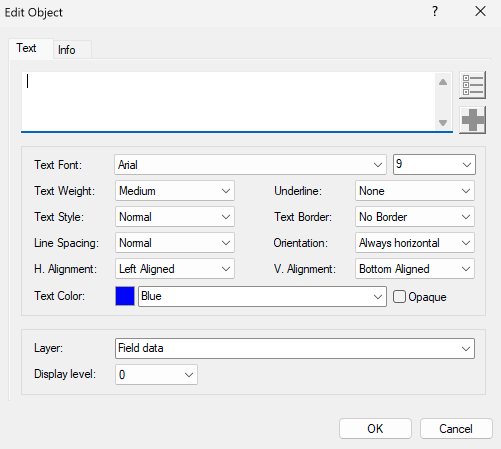
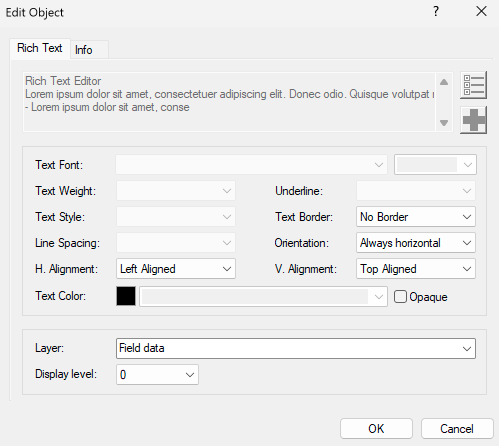
| Maximum of 254 characters | No limit on the number of characters | |
| CONTENT & FORMATTING | ||
All characters share the same formatting: one fixed font and font size per object | Multiple fonts, sizes, and styles within a single object. Content and formatting via the built-in Rich Text Editor. | |
| TEXT WRAPPING | ||
| New lines are added manually with ENTER. | Automatic text wrapping based on the width of the text frame. The frame can be interactively resized. | |
 |  | |
RESULT
By consciously choosing between Text and Rich Text, you work more clearly and efficiently. Use Text for short labels and Rich Text for longer explanations with formatting.
Rotation and Alignment
The behavior of text during rotation and alignment is the same for both text types. This is explained in the article Aligning and Rotating Text.
Was this article helpful?
That’s Great!
Thank you for your feedback
Sorry! We couldn't be helpful
Thank you for your feedback
Feedback sent
We appreciate your effort and will try to fix the article