Resolve 'Not a valid set of Codes for Global Options or for Extended Global Options'
When validating a CDF, Pythagoras may display the following error:
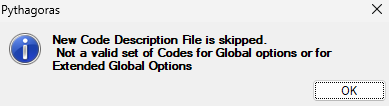
New Code Description File is skipped.
Not a valid set of Codes for Global options or for Extended Global Options.
This error typically indicates that the set of option abbreviations contains one or more conflicting abbreviations.
The most common cause is that a custom abbreviation conflicts with a default abbreviation that was not overridden.
Check for duplicate abbreviations
Each abbreviation must be unique within:
- the Global Options group;
- the Extended Global Options group.
The same abbreviation may be used once in each group, but it may not be assigned to two different options within the same group.
Check the default abbreviations
Options that are not explicitly defined keep their default abbreviation.
If you redefine only part of the option list, make sure none of your custom abbreviations conflict with the remaining default abbreviations.
For example, if L is already the default abbreviation for PERPENDICULAR_LEFT, assigning L to another Global Option creates a conflict. You can easily overlook this if you do not check the default abbreviations first.
CDF Header: Default Option Abbreviations
Recommended practice
To minimise the risk of abbreviation conflicts, define the complete set of Global Options and Extended Global Options.
RESULT
The CDF validates successfully once all option abbreviations are unique within the Global Options group and the Extended Global Options group.
RELATED ARTICLES
CDF Header: Default Option Abbreviations
Was this article helpful?
That’s Great!
Thank you for your feedback
Sorry! We couldn't be helpful
Thank you for your feedback
Feedback sent
We appreciate your effort and will try to fix the article