How to restart the Sentinel License Manager
Restart the Sentinel LDK License Manager when Pythagoras cannot retrieve or refresh the available licenses.
Close Pythagoras
Open Task Manager using the shortcut
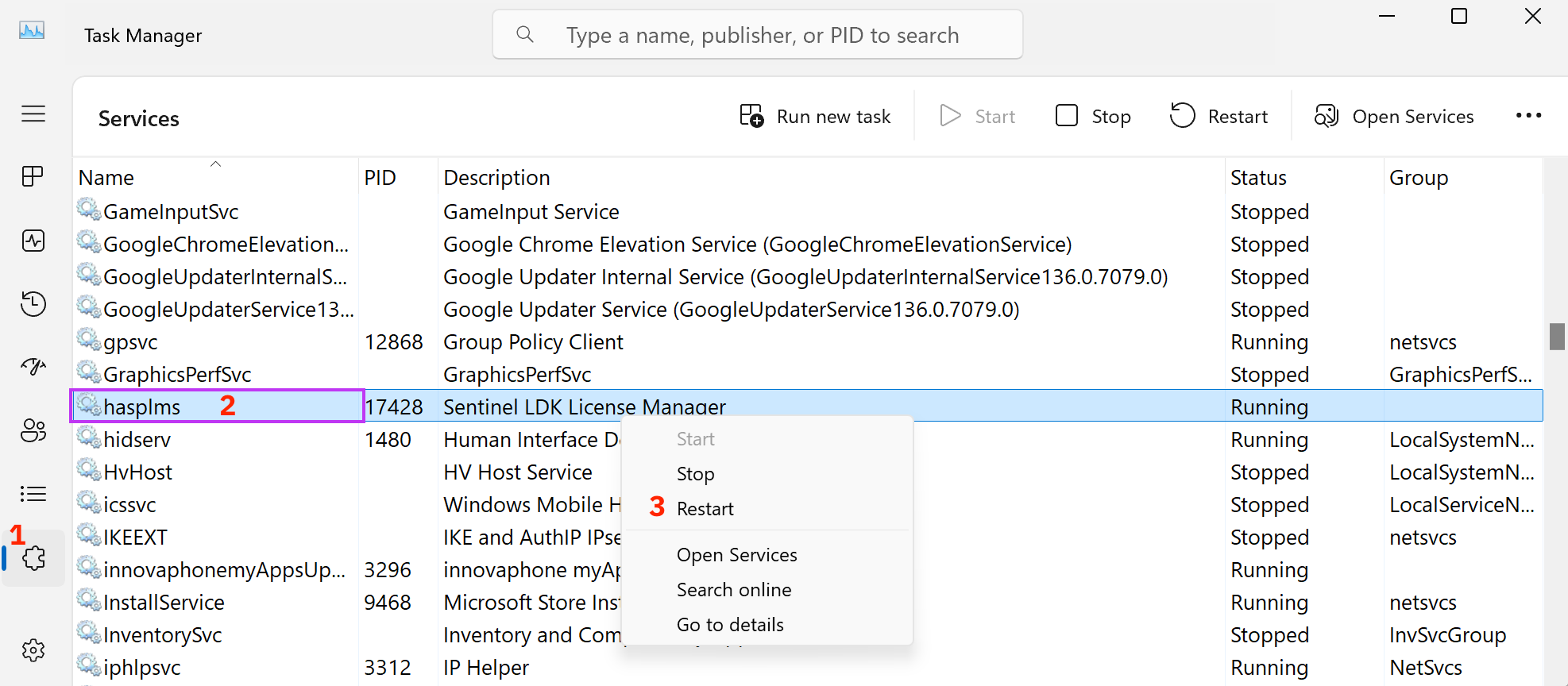
Ctrl+Shift+EscGo to the Services tab in the left navigation pane → see 1 in the image
Find hasplms in the list. Its description is Sentinel LDK License Manager. → see 2 in the image
Right-click on hasplms and select Restart (or Start if that’s available) → see 3 in the image
Wait a few seconds for the service to start.
Restart Pythagoras and check whether the expected license is now available.
The Sentinel LDK License Manager provides Pythagoras with information about available local and remote licenses and manages access to those licenses.
What if hasplms is not listed?
If hasplms is not listed, the Sentinel LDK Run-time Environment may not be installed correctly or may be damaged.
Repair or reinstall the Sentinel LDK Run-time Environment:
-> Repair or reinstall the Sentinel Runtime
After a successful installation, hasplms should appear in the Services list and start automatically with Windows.
Was this article helpful?
That’s Great!
Thank you for your feedback
Sorry! We couldn't be helpful
Thank you for your feedback
Feedback sent
We appreciate your effort and will try to fix the article