How to restart the Sentinel License Manager
Open Task Manager using the shortcut
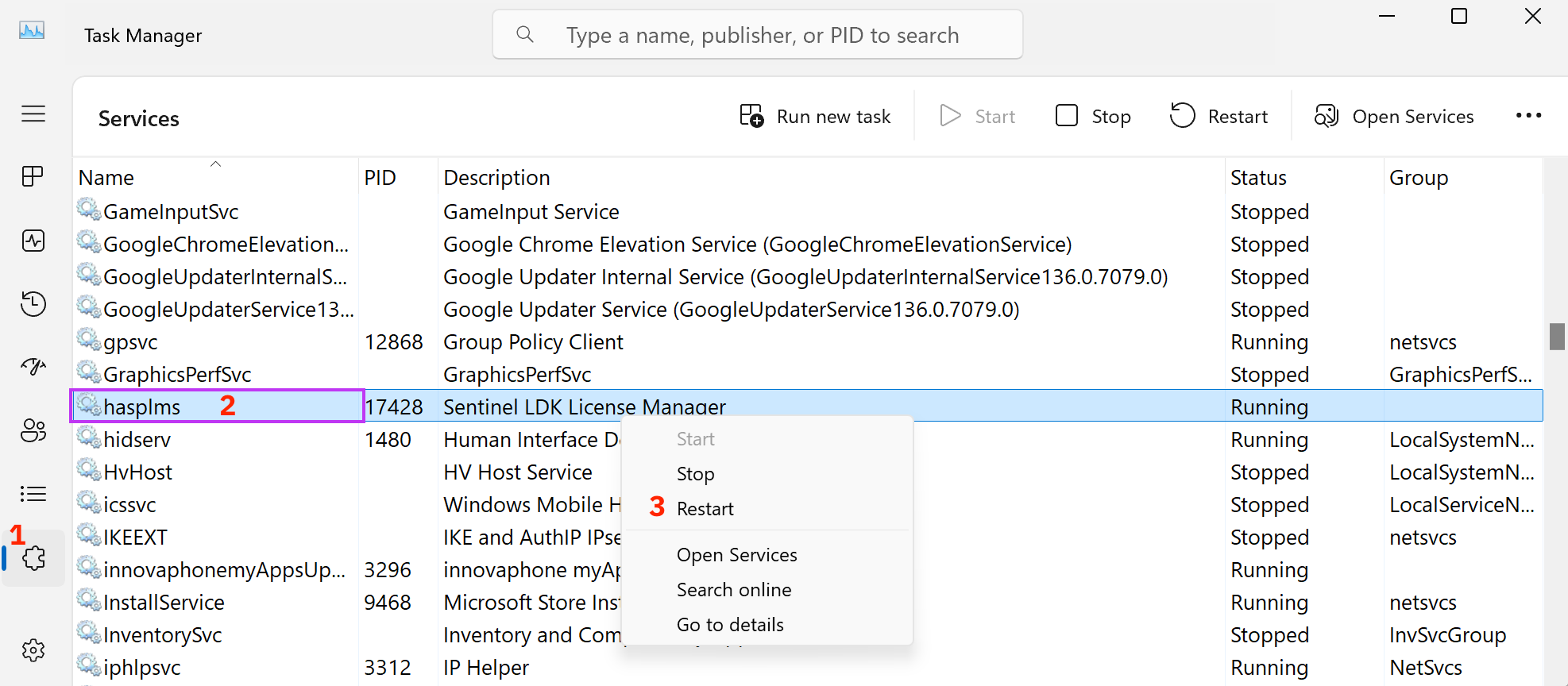
Ctrl+Shift+EscGo to the Services tab → see 1 in the image
Look for 'hasplms' (Sentinel LDK License Manager) in the list → see 2 in the image
Right-click on hasplms and select Restart (or Start if that’s available) → see 3 in the image
Wait a few seconds for the service to start.
What if 'hasplms' doesn’t appear in the list?
That usually means the Sentinel license software is not (properly) installed.
- Fully close Pythagoras
- Download the latest Sentinel Runtime (driver) here:
https://www.pythagoras.net/content/uploads/sites/2/cpt-downloads/HASPUserSetup.exe - Right-click the file and choose 'Run as administrator'
- After installation, restart your computer
hasplms service should now appear in Task Manager and start automatically.
Was this article helpful?
That’s Great!
Thank you for your feedback
Sorry! We couldn't be helpful
Thank you for your feedback
Feedback sent
We appreciate your effort and will try to fix the article