Calculation > Traverse > Closed...
Calculate a closed traverse
Use Calculation > Traverse > Closed... to calculate a closed traverse from known points, measured angles and measured legs. Pythagoras calculates the coordinates of the traverse points, the precision and the closing errors.
STEPS
- Open the drawing in which you want to calculate the traverse.
- Check whether the known points are already present in the drawing.
- Import data first only when needed:
- use File > Import > Coordinate List... for a file with point number, X, Y, Z and optionally a code;
- use File > Import > Data Collector... only for a data collector or total station file that requires device, format or coding interpretation.
- Go to Calculation > Traverse > Closed....
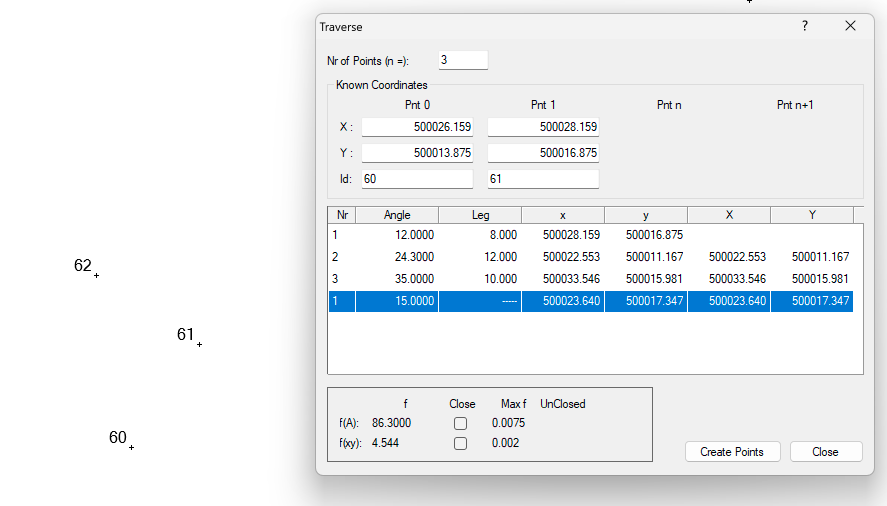
- In the Traverse dialog, enter the number of traverse points in Nr of Points (n =):
- Under Known Coordinates, enter the known points:
- Pnt 0: reference point for the orientation of the start point;
- Pnt 1: start point of the traverse;
- Pnt n: end point of the traverse;
- Pnt n+1: reference point for the orientation of the end point, when applicable.
- If these points already exist in the active drawing, enter their point number in Id. Pythagoras fills in the coordinates automatically.
- Enter the traverse data in the table, from the first point to the last point:
- Angle: the measured angle or direction;
- Leg: the measured length or distance.
- Check the intermediate results in the table. When the required data has been entered, Pythagoras calculates the coordinates of the traverse points.
- Check the closing information at the bottom of the dialog, such as f(A), f(xy) and Max f.
f(A) is the angular closing error. It shows the difference between the measured angular result and the expected angular closure of the traverse. If this value is large, check the entered Angle values, the orientation points and the traverse order.
f(xy) is the horizontal closing error in XY. It shows how far the calculated end position misses the expected closing position in plan coordinates. In a drawing with metres as unit, this value is interpreted in metres.
Max f is the maximum accepted error calculated by Pythagoras for that component. There is one value for the angular error and one for the XY error. Compare f(A) with the angular Max f, and f(xy) with the XY Max f.
- Use the Close checkboxes to check the effect of closure on the calculated coordinates.
- Click Create Points to create the calculated traverse points in the drawing.
RESULT
The closed traverse points are calculated and created in the drawing.
Options
- Use existing point numbers in Id to let Pythagoras fill in coordinates automatically.
- Use the Close checkboxes to compare the result with or without closure.
- Click Create Points only after checking the entered data and the closing information.
A coordinate list is not enough to adjust a closed traverse. Calculation > Traverse > Closed... also requires the raw traverse data, such as the traverse order, orientation points, measured angles and legs.
If Pythagoras shows The Traverse is not closed. Save the traverse points unclosed?, the entered data does not close as a closed traverse. Choose No if you expected a closed traverse and check the points, Angle and Leg values. If the measurement is intended to be an open traverse, use Calculation > Traverse > Open... instead.
Was this article helpful?
That’s Great!
Thank you for your feedback
Sorry! We couldn't be helpful
Thank you for your feedback
Feedback sent
We appreciate your effort and will try to fix the article