Explore how to use color maps for terrain models and point clouds
Color maps make your terrain model or point cloud not only more attractive but especially more insightful. They let you display height, slope, difference, or other properties using color gradients, so that patterns and anomalies stand out immediately.
In Pythagoras, there are five main types of color maps, each with a specific purpose:
For Terrain models
A color map displays height, slope, or difference values directly on the DTM.
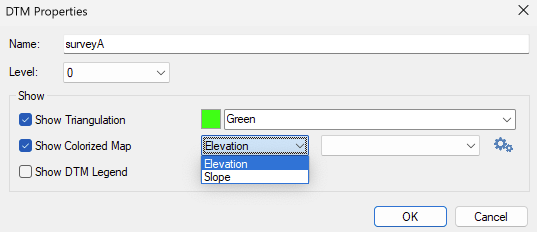
1. Show elevation differences – Elevation / Height
Colors the terrain model based on elevation (Z-value).
Ideal to make relief and high/low areas visible at a glance.
Commonly used for standard terrain visualizations.
Tip: For volume differences, use a difference color map
Read the article How to display earthworks (advanced) to see how fills and cuts are shown with a color scale.
2. Show slope – Slope
Colors the terrain model based on slope (in degrees or percent).
Helps identify steep zones or flat areas.
Useful for stability analysis or road and slope design.
Want to perform a slope analysis?
Read the article How to create a slope analysis.
For Point clouds
A color map can also be applied to a point cloud.
In the Point Cloud Properties window:
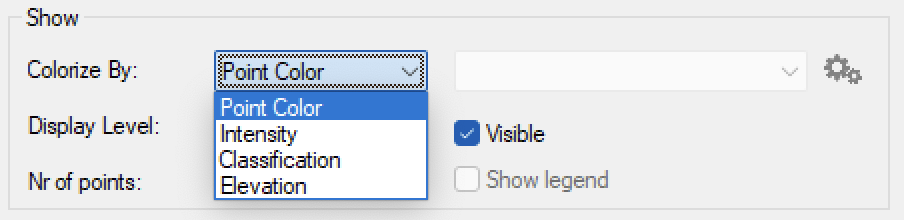
1. Point Colour
Colors points based on their RGB measurement value.
If the point cloud has no color information, points in Pythagoras are black by default.
Available only for point clouds.
2. Intensity
Colors points based on laser scan reflection intensity.
Useful to make material differences or objects in the point cloud clearer.
Available only for point clouds.
3. Classification
Colors points by class (e.g. ground, vegetation, buildings).
Makes it easy to get an overview of automatically or manually classified data.
Available only for classified point clouds.
4. Elevation (for point clouds)
Colors points based on height (Z-value).
Useful for quick overviews of relative elevation in large datasets.
Also available for terrain models.
Was this article helpful?
That’s Great!
Thank you for your feedback
Sorry! We couldn't be helpful
Thank you for your feedback
Feedback sent
We appreciate your effort and will try to fix the article