| File > Import > Image > Link to file |
Import a Large Image
Large images over 4000 pixels in width or height, or larger than 100 MB, such as orthophotos and high-resolution scans, are converted to PTIF by Pythagoras for optimal performance.
New and High Performance Image Format (PTIF)
Follow these steps for reliable performance and future-proof project sharing.
STEPS
- Go to File > Import > Image > Link to File...
- In Load Image File, select the image you want to use.
- Click Open.
- Choose where to save the PTIF file. Save it inside your project folder for best performance.
If the project folder does not exist yet, create one and save both the drawing and the image inside it. Wait for the Converting Image progress bar to finish.
Save your .pyt drawing after the PTIF has been created.
Double-click the imported image to open Edit Object.
Enable Use relative filename to keep links working when the project folder is moved or shared.
Use an absolute filename only when the image is stored in a fixed, central library.
This defines how Pythagoras locates the PTIF file in the future.
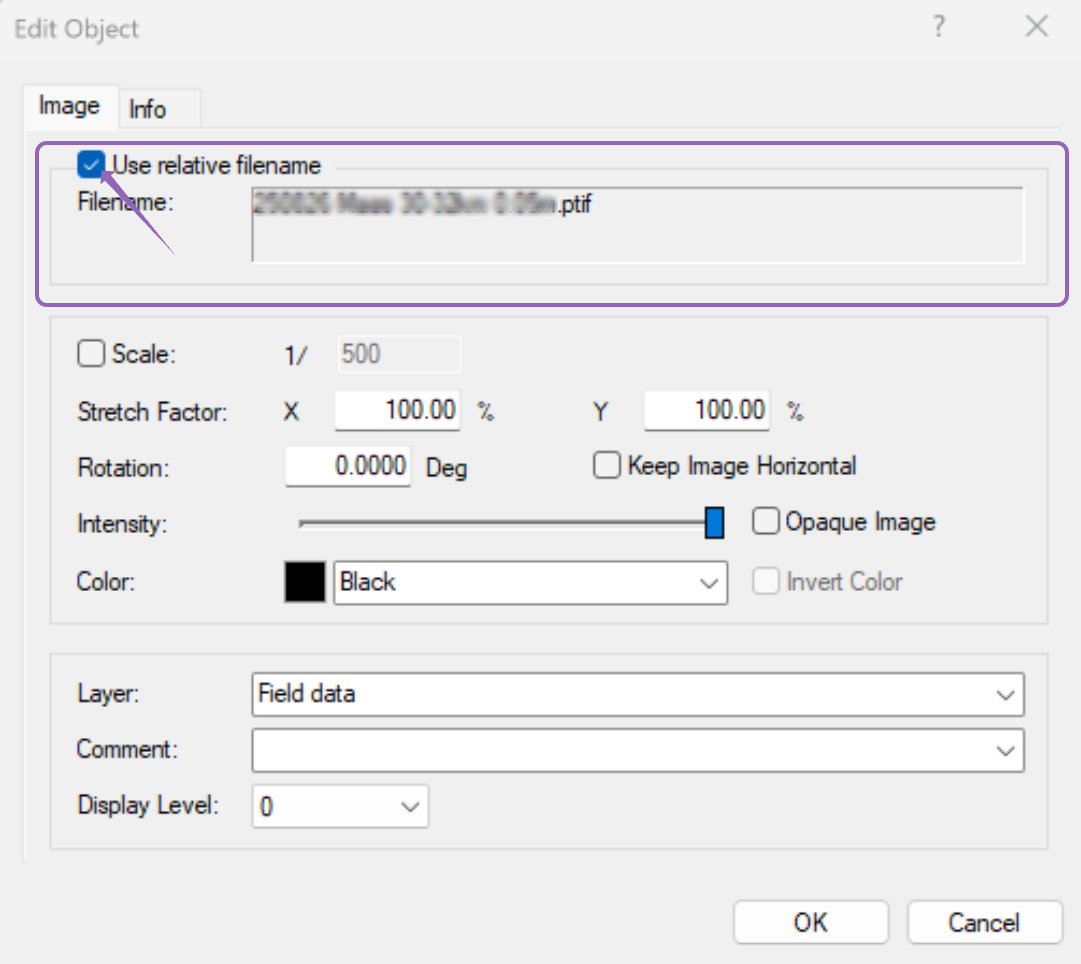
Use relative filename (recommended)
Best option for servers, shared drives, and teamwork
Keeps links intact when the project folder moves
Works with cloud storage (OneDrive, SharePoint, Dropbox)
Ideal when the image is stored inside the project folder
Use absolute filename (only when needed)
Use for images stored in a fixed central library
Not recommended for projects that move between locations
Links may break if users have different drive mappings
RESULT
You have imported a large image, generated a PTIF file, and applied the recommended path settings for stable performance and safe project sharing.
Was this article helpful?
That’s Great!
Thank you for your feedback
Sorry! We couldn't be helpful
Thank you for your feedback
Feedback sent
We appreciate your effort and will try to fix the article