LOCAL SOFTWARE LICENSE
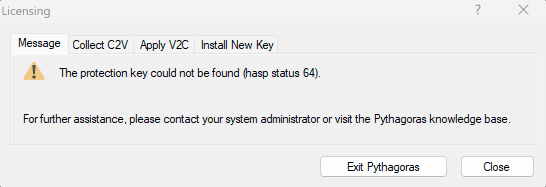
The protection key could not be found (hasp status 64).
When starting Pythagoras, you may see the message The protection key could not be found (hasp status 64).
Your local software license has become blocked because Windows or the virtual machine configuration has changed. This can happen after reinstalling Windows, restoring a virtual machine or changing virtual hardware.
The license itself is not lost, but it is temporarily blocked for safety reasons.
SOLUTION
STEP 1: COLLECT C2V
STEP 2: SEND THE C2V FILE
Send the C2V file to Pythagoras Support (support@pythagoras.net) .
Support will generate a V2C update file to repair the license.
Once you receive an answer back with the V2C:
STEP 3: APPLY V2C
Your license is now activated and Pythagoras is ready for use.
Was this article helpful?
That’s Great!
Thank you for your feedback
Sorry! We couldn't be helpful
Thank you for your feedback
Feedback sent
We appreciate your effort and will try to fix the article