Export pipe and manhole data to CSV
The sewerage macro lets you export pipe and manhole data to a CSV file, which you can open in Excel, for example. Pipes and manholes are exported in separate reports.
1. Prepare the export
Open the drawing containing the sewerage data you want to export. The export includes all registered pipes or manholes in the drawing. No selection is required; selecting objects does not limit the export.
To include junction invert levels in the manhole report, first run Sewer Network > Calculate & Annotate for the relevant manholes. This assigns the junction letters used in the report.
2. Export a report
Choose Sewer Network > Export….
Select Pipe report or Manhole report.
Enter a file name and choose a save location.
Confirm to save the CSV file.
If no data is available for the selected report, the macro displays There is nothing to export.
3. Report contents
Pipe report
The report contains one row per pipe, with the following data: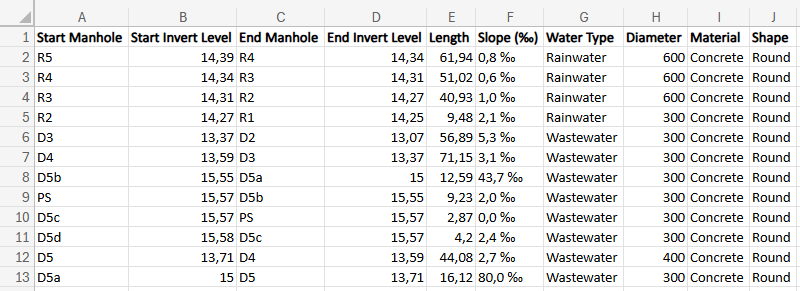
Manhole report
The report contains one row per manhole, with the following data: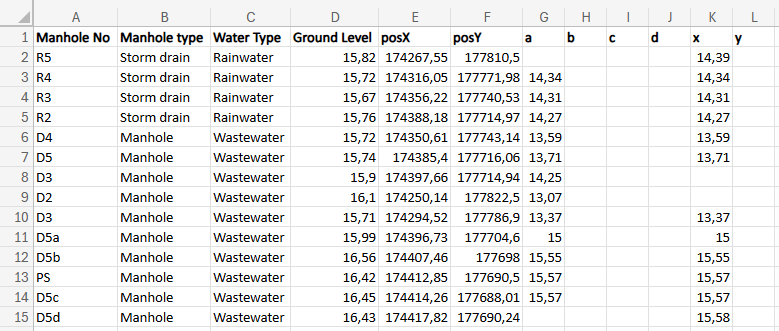
Manhole X and Y coordinates, in the posX and posY columns.
Junction invert levels, in columns a, b, c, d for incoming connections, x and y for outgoing connections. The junction letters correspond to those in the manhole annotation. A column remains empty if no junction with that letter is registered.
NOTE: the manhole report only includes junction columns a, b, c, d, x and y. Junctions with other letters are not exported as additional columns.
Number format and separator
The number format follows the macro settings:
| Decimal separator | Column separator |
|---|---|
| Comma | Semicolon |
| Point | Comma |
The configured decimal places for lengths and levels also apply to the export. The slope is displayed with one decimal place.
If all data appears in a single column when you open the file in Excel, import it as a CSV file and select the appropriate column separator.
Was this article helpful?
That’s Great!
Thank you for your feedback
Sorry! We couldn't be helpful
Thank you for your feedback
Feedback sent
We appreciate your effort and will try to fix the article