Calculation > Transformation > Affine Transformation
Asymmetric Scaling with an Affine Transformation
An affine transformation allows you to transform a drawing or image using common control points. Unlike a Helmert transformation, an affine transformation calculates separate scale factors for the X and Y directions. This makes it particularly useful for distorted scans or drawings that have been scaled non-uniformly.
For reliable results, use at least four well-distributed control points.
STEPS
- Open both the source drawing and the reference drawing.
- Ensure that the common control points have the same point numbers in both drawings.
- Select the control points in the source drawing.
- Go to Calculation > Transformation > Affine Transformation.
- Click Look up XY coordinates and select the reference drawing. The corresponding coordinates are filled in automatically.
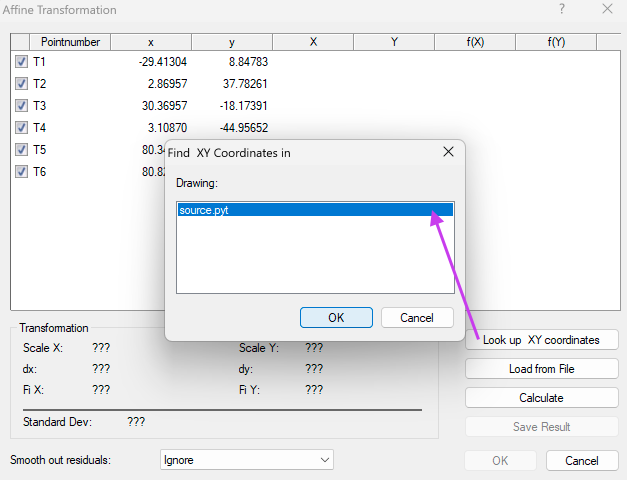
- Click Calculate.
- Review the calculated transformation parameters and the standard deviation.
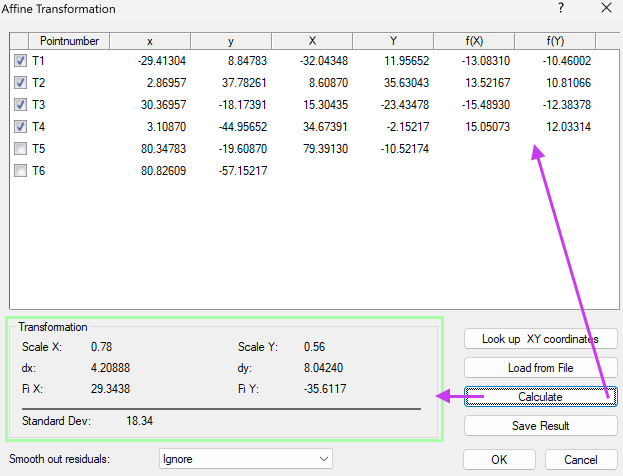
- Click OK.
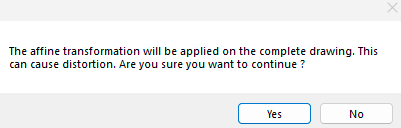
- Confirm the transformation by clicking Yes.
Interpreting the results
After the calculation, Pythagoras displays the following transformation parameters:
- Scale X – Scale factor in the X direction.
- Scale Y – Scale factor in the Y direction.
- dX and dY – Translation values.
- Fi X and Fi Y – Rotation angles.
- Standard Dev – Quality indicator of the transformation. A value of
0indicates a perfect match between the control points. The lower the value, the better the transformation fits the control points.
If Scale X and Scale Y are equal, the drawing is scaled uniformly.
If the values differ, the drawing is scaled asymmetrically.
Advanced options
• Excluding control points
If a control point has a large residual, you can exclude it from the calculation by clearing its checkbox.
After excluding the point, click Calculate again to evaluate the effect on the standard deviation.
• Smooth out residuals
Small residual errors may remain after the transformation. The Smooth out residuals option distributes these residuals over the rest of the drawing.
Available methods:
- Ignore – Applies the affine transformation without residual smoothing.
- Natural Neighbours by Area (NN Area) – Gradually distributes residuals across the drawing.
- Inverse Distance Weighting (1/s²) – Gives more influence to nearby control points than to distant ones.
Use residual smoothing only when the drawing or image contains local distortions, such as a warped scan or an old paper map.
RESULT
The selected objects are transformed using the calculated affine transformation. When required, different scale factors are applied independently in the X and Y directions, allowing asymmetrical scaling.
Was this article helpful?
That’s Great!
Thank you for your feedback
Sorry! We couldn't be helpful
Thank you for your feedback
Feedback sent
We appreciate your effort and will try to fix the article